The VibeARP MCP server enables Codex, Claude Code, OpenCode, and similar AI agent-running environments (“agent harnesses”) to work together with ARP, making it faster and easier to create RO-Crate data packages by leveraging the capabilities of these agents.
With VibeARP MCP, the metadata for a data package can be assembled with just a few prompts, for example based on the files contained in the package or by pointing the agent to the project website, where information such as authors and contributors may already be available. The necessary information can also be collected automatically using web search and computer use.
The role of VibeARP MCP is to map the collected information to the appropriate ARP RO-Crate profiles and then upload the resulting validated and properly FAIR data package to the ARP repository.
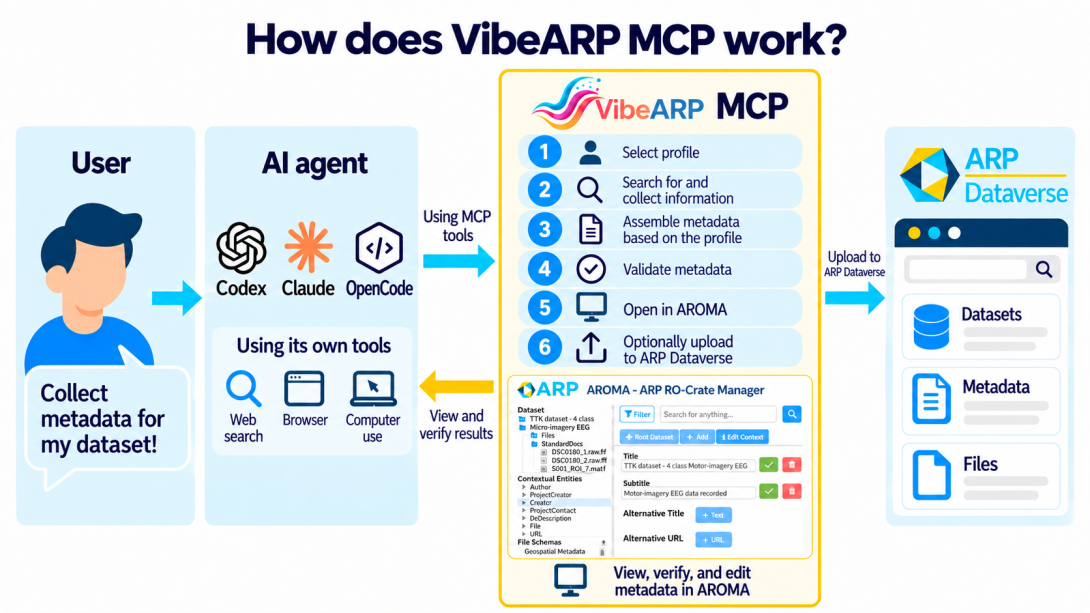
For example, someone with a ChatGPT subscription may also be able to use Codex from the command line or from the ChatGPT desktop application. Codex already has a wide range of capabilities by default: web search, image understanding, processing files to extract metadata using programs installed on the user’s computer, using a browser to perform more complex web-based tasks, and more. From Codex’s perspective, these are all so-called “tools,” which it can intelligently select and use depending on the task at hand.
Codex and similar agent-running environments can also be extended with new tools and, consequently, new capabilities. One way to do this is through various MCP (Model Context Protocol) servers. An MCP server provides agents with specific tools that they can use on demand in much the same way as their built-in tools.
The VibeARP MCP server extends agents with tools for working with RO-Crate. These include tools for interpreting, editing, and validating RO-Crate files, as well as uploading completed data packages to ARP.
RO-Crate is a format that is easy for AI agents to work with, but it is less convenient for humans. Researchers need to be able to keep track of what kind of data package their agent is assembling, what information it is adding, and whether that information is correct. This also requires a human-facing user interface.
For editing RO-Crate packages, ARP has long provided such an interface in the form of the ARP AROMA RO-Crate editor. Until now, AROMA could be opened from Dataverse, where users could edit metadata available in Dataverse in RO-Crate format, as well as add more detailed metadata beyond what Dataverse supports, including file-level metadata.
AROMA is now also accessible from VibeARP. This means that at any time we can ask the agent to open the RO-Crate it is editing in AROMA in a web browser. We can then review the agent’s work through the familiar interface or even edit the metadata manually.
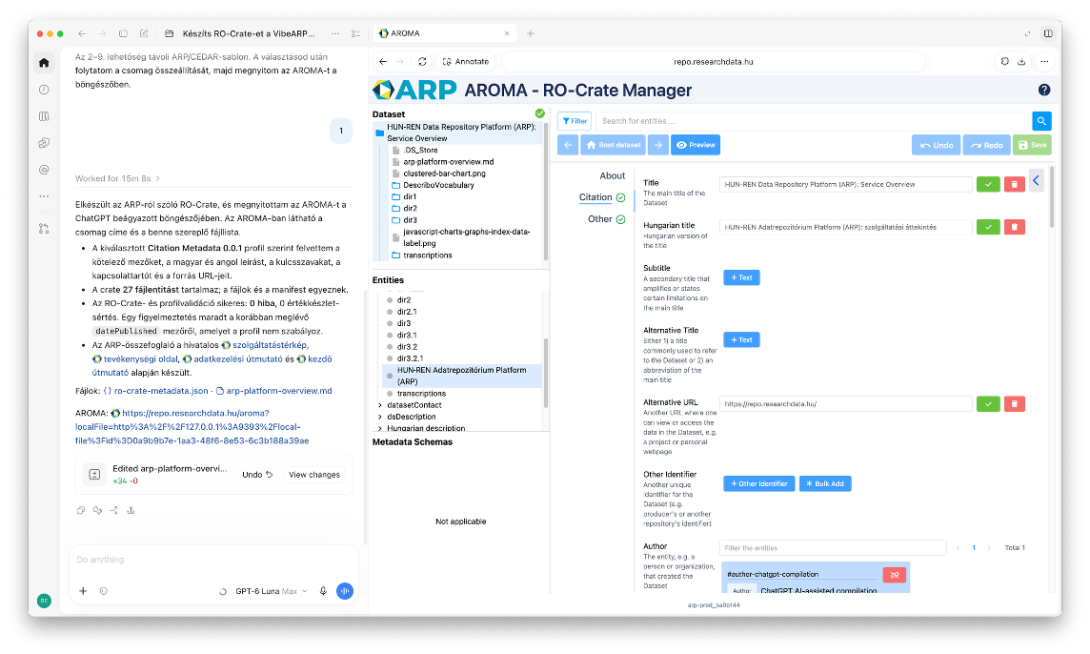
And for this, we do not even need to leave, for example, the Codex desktop application, since it also includes a built-in browser. This makes it possible to conveniently view the current agent chat and AROMA side by side. AROMA automatically refreshes as the RO-Crate changes, so it always displays the current metadata.
The VibeARP installation guide is available here:
https://www.npmjs.com/package/@arpproject/vibearp-mcp
However, if you do not want to spend much time setting it up, you can simply start Codex, for example, and ask it:
Install VibeARP MCP for Codex by following the instructions here:https://www.npmjs.com/package/@arpproject/vibearp-mcp!
If necessary, it will also install the Node runtime and anything else that is missing.
After restarting Codex, VibeARP MCP is ready to use!